This is a good day for me. I’ve finally tried the improved migrations feature in the latest version of RedGate SQL Source Control and I’ve tested the feature against all my typical cases so that I can share my findings with you.
What is the migrations feature?
When a change set includes an edit which leads to data loss (or a deploy schema error due to constraints definitions), we need to create a script that avoids any regression/block during the deployment phase. This is true also when working as a distributed team in a continuous integration based environment. We need to avoid members of our team being blocked any time changes are shared and minimize the risk of regressions.
Migrations in SQL Source Control means “migration SQL scripts”. We are speaking about custom scripts, related to the changed objects, that let us avoid regressions. They are created whenever there is a likelihood of a potential problem or data loss occurring on an object and inserted when getting the latest version of our database from our source control system. But the most important thing is that they are applied when deploying our databases to the test/staging/production environments.
Migrations feature history
A migrations feature has been implemented more than one time into Redgate SQL Source Control unfortunately with some trouble, especially when trying to merge the migration scripts between different branches and to integrate the most recent source control systems. (You can read a brief history of migrations in SQL Source Control in this blog post). However, the latest version of migrations in SQL Source Control v5 is a great implementation, which supports also a generic Working Folder (no matter what version control system is installed, we are just using a simple folder). So, you may hear about the previous versions, Migrations V1, V2, and you will find some capability in SQL Compare projects, but, using the new migrations feature in SQL Source Control v5 will resolve everything.
A real scenario
The environment I’m working on is a multi-branch scenario, implemented in Visual Studio Team Service, like the following one:
- A VSTS local workspace folder mapped to the VSTS team project
- A local folder for each branch (dev | main | release), mapped to the VSTS branches
- The folder of the database in each branch
The purpose of this article is to demonstrate what are the capabilities when managing two typical cases. The first is about a breaking-change, a NOT NULL column addition to a table. The second is a data-only migration script, which can be inserted during the deployment phase.
Migration for NOT NULL column addition
Adding a NOT NULL column to a table can lead to a potential delivery problem. Indeed, in a dev environment, when a developer tries to get the change and the target table has rows, the NOT NULL constraint will be violated. The same could happen in any environment when deploying.
When this kind of change occurred, I used to create a “Pre-release” script for adding the column with NULL, then writing data inside it and finally, adding the NOT NULL constraint. This was manually managed – until now – and it took me some time, typically the day before the deployment (it’s not usually just a matter of a single table). I had to create sql scripts, folders, naming conventions and I had to remember to execute them. When we’re talking about automation, this is a step backwards and it opens us up to the risk of human error. Last but not least, this is a more complex solution to setup on the deployment software we are using, Octopus Deploy.
In the following scenarios we will try to understand what will happen when:
- replacing a schema change with a migration script
- sharing change set with other developers
- merging the branches
- using data-only migration script
Replace a schema change with a migration script
When we need to replace the schema change with our script, a schema-data-schema migration script is the best choice.
Suppose we have two developers, Dev1 and Dev2, who are working with a dedicated database model on SQL Source Control on the dev branch. They have the same table in their databases (StoreDb), called Inventory.Items (ItemId int PK, Name varchar(30), CategoryId smallint). Dev1 table is empty, while the Dev2 one has ten rows. Dev1 executes the following command:
Use StoreDb;
GO

ALTER TABLE Inventory.Items ADD InsertTimestamp datetime NOT NULL;
GO
Since the table is empty for Dev1, the command is executed successfully. But Dev1 ignored the potential problems about data loss/constraint violation. Fortunately, SQL Source Control warns him when he tries to commit the changes:
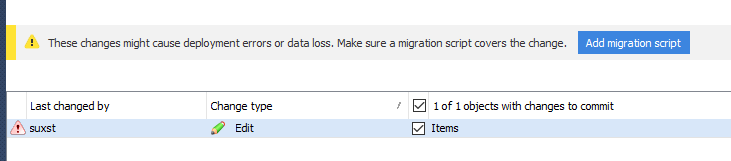
Dev1 can add a migration script, related to the object that is changed:
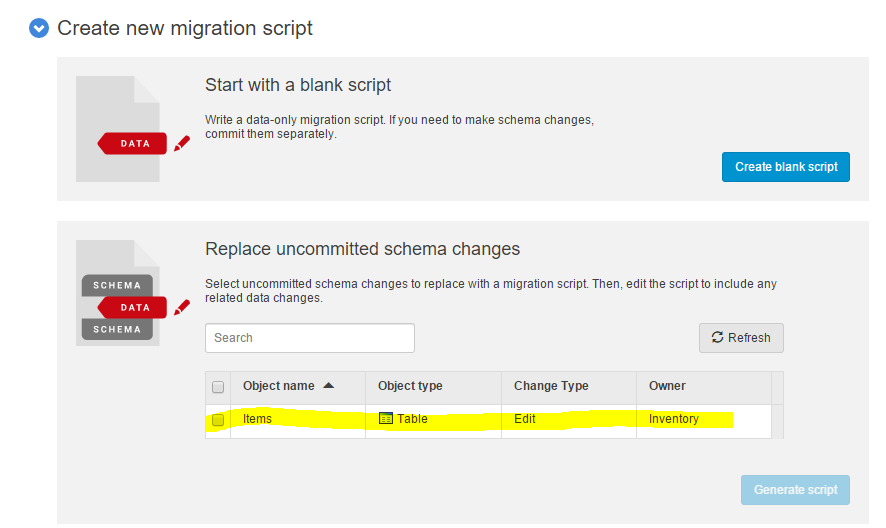
Pressing “Generate script” of the selected object will show the proposed t-sql migration script:
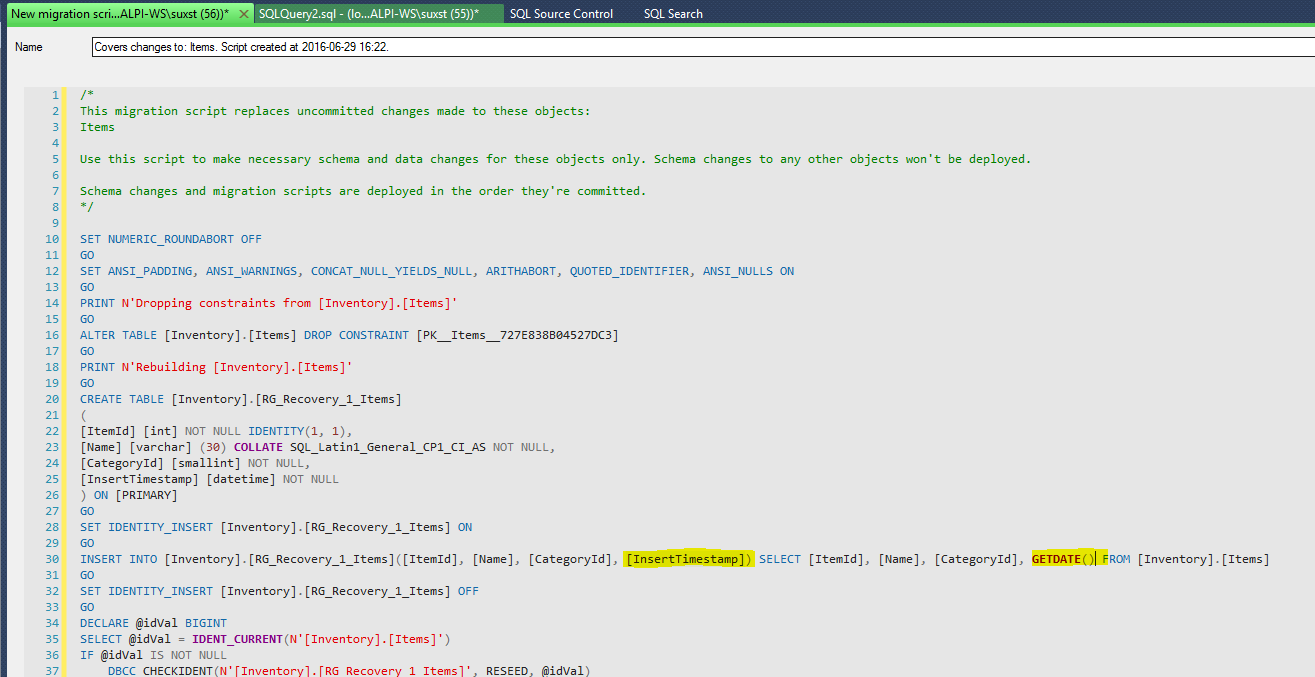
As you can see, the proposed script is not really “completed”, because it’s up to Dev1 to add the desired behavior for the new NOT NULL column. The highlighted part is the migration addition. However, the change that should be added is simple and quick.
Dev1 can “Save and close” and the commit tab becomes as described in the picture below:

The generated migration script replaces the suggested schema change. This allows us to avoid any constraint violation.
Sharing changes to other developers
What is going to happen on the other developers’ workstations? When Dev1 execute a check in of the column addition change, Dev2 can get the latest version of the database. Keep in mind that Dev2 has already the database with the Inventory.Items table, with ten rows, a version without the Dev1 change.
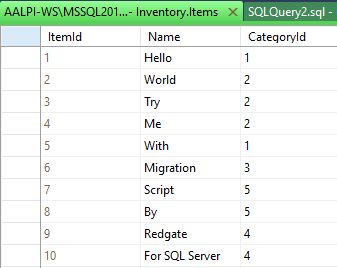
They are using Working Folder, so they need to get the files from the source control (VSTS, using team explorer, for example) and then apply changes to the databases. Dev2 can see the following:

Without the migration he receives errors (NOT NULL constraint violated), while the migration let him go ahead. Indeed, the get latest works and the ten rows have been updated with the logic of the migration script.
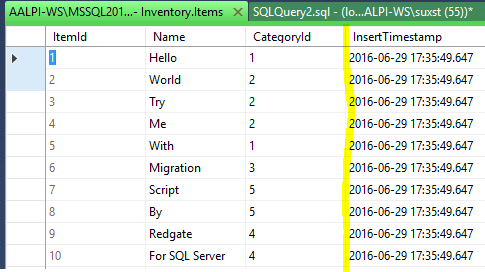
Merging branches
What if Dev1 and Dev2 merge the branch they are working on with another line? Suppose that Dev2 starts a merge process between dev and main branches. Getting the latest version from the main branch will behave in the same way. This means that the migration script is replicated also switching the repository. This didn’t work in the past, and I can definitely say that is working well now. This is a great point, especially when frequent merges occurs.
When using data-only migration scripts?
When the change has been already committed and we need to update the data on the changed object, the data-only (blank) migration script is the right choice. The “split column” or “merge columns” refactors are good examples.

In the split column scenario we have:
- create the new columns, then commit
- add a migration script for updating values from the composite column, then commit
- drop the composite column, then commit

In the merge columns scenario we have:
- create the new column, then commit
- add a migration script for aggregating values from the other columns, then commit
- drop the other columns, then commit
In both cases, sharing or deploying will deliver the changes respecting the commit order. You can read the migrations samples here.
What SQL Source Control does under the hood?
A deployment script that involves migrations consists of compare blocks and migration blocks:
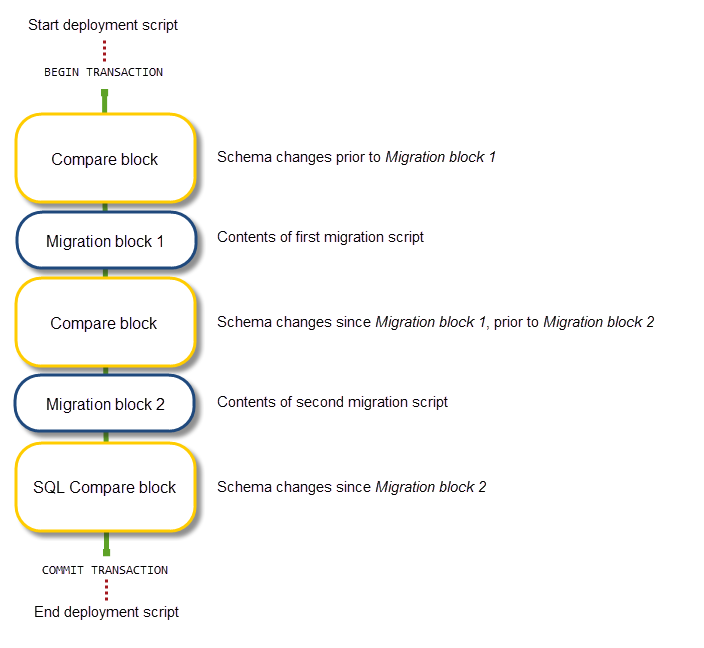
RedGate SQL Source Control creates a set of items inside a “Custom Scripts” folder, which is inside the folder of the database itself:
- <datetime> ue auto: configurations and settings about the comparison (also the RedGateDatabaseInfo.xml)
- <datetime> uf user: migration script (sql script and json files for transformations)
- DeploymentOrder.json file, which is the order of migration deployment
Additionally, a RedGateLocal.DeploymentMetadata is added into the database. This table contains the list of executed migration scripts on the database and it allows us to avoid any duplication when the scripts are applied. More details here.
What about the deployment phase?
SQL Source Control is not used for delivering changes to test/staging/production environments. The other tools in the Redgate SQLToolbelt able to do that are SQL Compare and SQL Data Compare, which compare structures and data, or DLM Automation which plugs into your release management tool.
As the get/apply processes, the comparison one will check for the set of items into the “Custom Scripts” folder and will look up the entries on the RedGateLocal.DeploymentMetadata table, respecting the SQL Source Control commit order. If the migration has been already delivered, it will be skipped, in order to avoid any double execution. This means that we will find the table also in our test/staging/production environments.
Conclusions
The “Migrations” feature in SQL Source Control v5 comes finally with a great implementation. The suggested scripts are good, everything is clear and simple to understand. Additionally the user interface changes are welcome, also speaking about style. The great point is, in my opinion, the advantage that we can get from automation. All manual operations, which were necessary before this release, suddenly disappear. We can simply insert the folder into Octopus (or TeamCity, or another deployment tool) and execute the comparison against our environments avoiding regressions and data loss.
That’s the way we like it!